
一、阿里云购买服务器 centos7.9
二、购买域名
三、域名备案
四、配置代码运行环境
1 安装nginx 1.26
(1)、安装 EPEL 仓库(如果尚未安装)
sudo yum install -y epel-release
# 添加 Nginx 官方仓库
sudo rpm -Uvh http://nginx.org/packages/centos/7/noarch/RPMS/nginx-release-centos-7-0.el7.ngx.noarch.rpm
# 检查可用的 Nginx 版本
sudo yum –showduplicates list nginx
如果nginx-release-centos-7.0el7.ngx.noarch.rpm失效,可尝试:
sudo yum install -y yum-utils
sudo yum-config-manager –add-repo https://nginx.org/packages/centos/7/x86_64/
(2)安装Nginx 1.22
sudo yum install -y nginx
(3)启动Nginx并设置开机自启
sudo systemctl start nginx
sudo systemctl enable nginx
(4)检查Nginx版本
nginx -v
# 应该输出类似:nginx version: nginx/1.22.x
(5)、放行防火墙(如果启用)
sudo firewall-cmd –permanent –add-service=http
sudo firewall-cmd –permanent –add-service=https
sudo firewall-cmd –reload
(6)、访问测试
浏览器访问 http://你的服务器IP,应该能看到 Nginx 欢迎页。
2 安装node 1.14版本
CentOS 7 默认的 yum 仓库不提供 Node.js 14,我们需要从 NodeSource 安装。
(1) 添加 NodeSource 仓库
# 安装 curl(如果未安装)
sudo yum install -y curl
# 添加 Node.js 14 仓库
curl -sL https://rpm.nodesource.com/setup_14.x | sudo bash –
(2) 安装 Node.js 14
sudo yum install -y nodejs
(3) 检查安装
node -v # 应该输出 v14.x.x
npm -v # 应该输出 6.x.x
(4) 可选:配置 npm 淘宝镜像(加速下载)
npm config set registry https://registry.npmmirror.com
3. 验证环境
nginx -v
# 输出:nginx version: nginx/1.22.x
node -v
# 输出:v14.21.3(或类似)
4、构建vue项目
1、前端vue项目打包生成dist文件
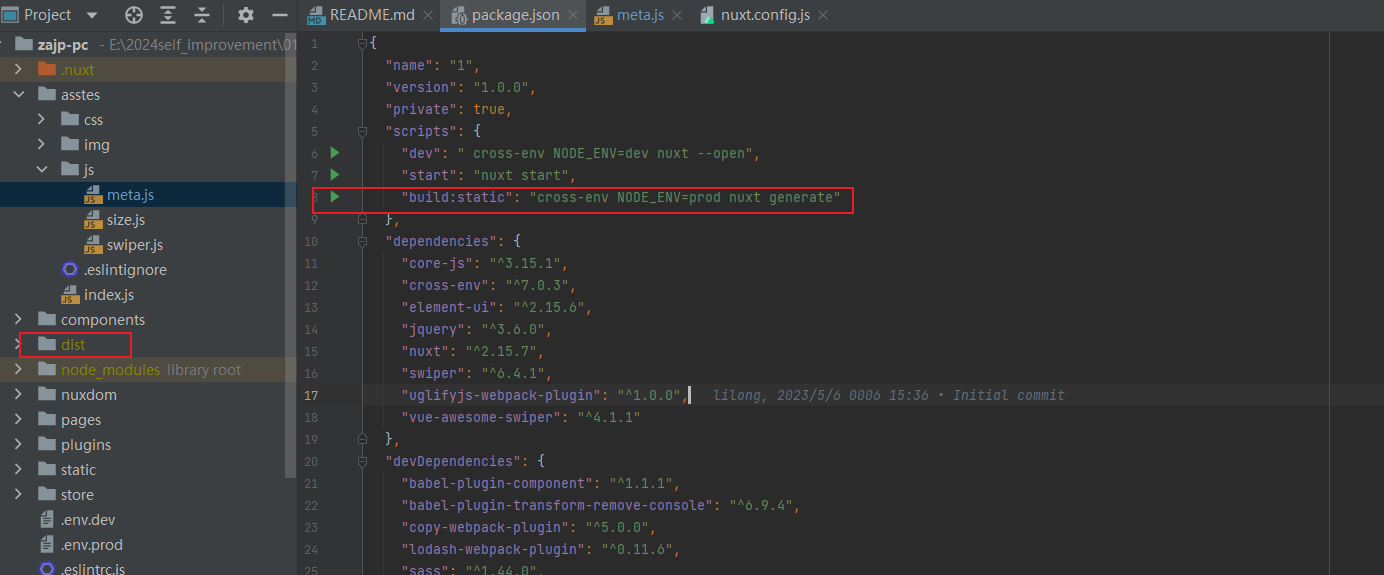
2、把dist文件上传到服务器根目录下的文件夹下面
3、配置nginx托管Vue项目
3. 配置 Nginx 托管 Vue 项目
(1) 创建 Nginx 配置文件
sudo vim /etc/nginx/conf.d/vue-project.conf
写入以下配置(根据实际情况修改路径):
server {
    listen 80;
    server_name your-domain.com;  # 替换为你的域名或服务器IP

    # Vue 项目的 dist 目录路径
    root /home/vue-project/dist;
    index index.html;

    # 处理 Vue Router 的 history 模式
    location / {
        try_files $uri $uri/ /index.html;
    }

    # 静态资源缓存(优化性能)
    location ~* \.(js|css|png|jpg|jpeg|gif|ico|svg)$ {
        expires 1y;
        add_header Cache-Control "public, no-transform";
    }

    # 防止 .env 等敏感文件泄露
    location ~ /\.(?!well-known).* {
        deny all;
    }
}
(2) 测试 Nginx 配置
sudo nginx -t # 检查语法是否正确
如果输出 syntax is ok,则继续。
(3) 重启 Nginx
sudo systemctl restart nginx
4. 访问 Vue 项目
-
浏览器访问:
-
如果配置了域名,访问
http://your-domain.com。 -
如果未配置域名,访问
http://你的服务器IP。
-
-
如果出现 404 或空白页:
-
检查
dist/目录路径是否正确。 -
确保 Nginx 配置中的
root指向dist/目录。 -
查看 Nginx 错误日志:
sudo tail -f /var/log/nginx/error.log
-
5. 进阶优化(可选)
(1) 启用 HTTPS(使用 Let’s Encrypt)
# 安装 certbot
sudo yum install -y certbot python3-certbot-nginx

# 申请证书(需域名已解析到服务器)
sudo certbot --nginx -d your-domain.com

# 自动续期测试
sudo certbot renew --dry-run
Nginx 会自动更新配置,强制 HTTPS 访问。
(2) 配置 Gzip 压缩(优化加载速度)
在 Nginx 配置中添加:
gzip on;
gzip_types text/plain text/css application/json application/javascript text/xml application/xml application/xml+rss text/javascript;
gzip_min_length 1024;
gzip_proxied any;
在 Nginx 中安装 SSL 库(如 OpenSSL)的主要目的是为了支持 HTTPS 加密通信,确保客户端(如浏览器)与服务器之间的数据传输是安全的。以下是详细解释:
1. SSL 库的作用
SSL(Secure Sockets Layer)及其继任者 TLS(Transport Layer Security)是加密协议,用于:
-
加密数据传输:防止敏感信息(如密码、信用卡号)被窃听。
-
身份验证:通过证书验证服务器身份,防止中间人攻击。
-
数据完整性:确保数据在传输过程中未被篡改。
Nginx 依赖 OpenSSL 等库来实现 HTTPS 功能。
2. 为什么 Nginx 需要 SSL 库?
当你在 Nginx 中配置 HTTPS 时,需要:
-
生成或获取 SSL 证书(如 Let’s Encrypt 免费证书)。
-
在 Nginx 配置中指定证书路径:
server {
    listen 443 ssl;
    ssl_certificate /path/to/cert.pem;
    ssl_certificate_key /path/to/key.pem;
    # 其他配置...
}
-
Nginx 通过 OpenSSL 库:
-
解密客户端发送的加密请求。
-
加密返回给客户端的数据。
-
如果服务器未安装 SSL 库,Nginx 无法处理 HTTPS 请求,会报错如下:
nginx: [emerg] the "ssl" parameter requires ngx_http_ssl_module
3. 如何为 Nginx 安装 SSL 支持?
(1) 确认 Nginx 是否已支持 SSL
nginx -V 2>&1 | grep -o with-http_ssl_module
-
如果输出
with-http_ssl_module,说明已支持 SSL。 -
若无输出,需重新编译 Nginx 或安装 OpenSSL。
(2) 安装 OpenSSL(如果缺失)
# CentOS/Alibaba Cloud Linux
sudo yum install -y openssl openssl-devel

# Ubuntu/Debian
sudo apt install -y openssl libssl-dev
(3) 重新编译 Nginx(仅限源码安装)
如果 Nginx 是通过源码安装且未启用 SSL,需重新编译:
# 进入 Nginx 源码目录
./configure --with-http_ssl_module  # 添加 SSL 模块
make
sudo make install
(4) 直接安装预编译的 Nginx(推荐)
大多数官方仓库的 Nginx 已默认包含 SSL 模块:
# CentOS/Alibaba Cloud Linux
sudo yum install -y nginx

# Ubuntu/Debian
sudo apt install -y nginx
4. 实际应用场景
场景 1:配置 HTTPS 网站
server {
    listen 443 ssl;
    server_name example.com;
    ssl_certificate /etc/letsencrypt/live/example.com/fullchain.pem;
    ssl_certificate_key /etc/letsencrypt/live/example.com/privkey.pem;
    # 其他配置...
}
场景 2:强制 HTTP 跳转到 HTTPS
server {
    listen 80;
    server_name example.com;
    return 301 https://$host$request_uri;
}
5. 常见问题
Q1: 为什么 Nginx 报错 unknown directive "ssl"?
-
原因:Nginx 未编译 SSL 模块。
-
解决:
-
安装 OpenSSL 并重新编译 Nginx。
-
或直接使用预编译的 Nginx 包(如
nginx官方仓库版本)。
-
Q2: 如何检查 SSL 证书是否生效?
-
浏览器访问
https://你的域名,确认地址栏显示 🔒 图标。 -
使用工具检测:
openssl s_client -connect example.com:443 -servername example.com
Q3: Let’s Encrypt 证书如何自动续期?
# 安装 certbot
sudo yum install -y certbot python3-certbot-nginx

# 设置自动续期
sudo certbot renew --dry-run

评论(1)
Hi, how have you been lately?